
IVANKY
"Don't miss out!" The iVANKY FusionDock Max 2 is now 20% off on Amazon!
Amazon商品名: iVANKY 23-in-1 FusionDock Max 2 for Thunderbolt 5, 120Gbp MacBook Docking Station, Triple 6K@60Hz Native Display for Mac M1-M5 Pro/Max, 140W PD, 2.5GbE, Cooling Fan (Incompatible with Windows)
$399.972026-01-05 Amazon price
Buy on AmazonAttention Mac users! The highly sought-after iVANKY FusionDock Max 2, offering triple 6K@60Hz displays and lightning-fast Thunderbolt 5 speeds, is now available on Amazon with an incredible 20% discount. Upgrade your workstation today!
Product Overview
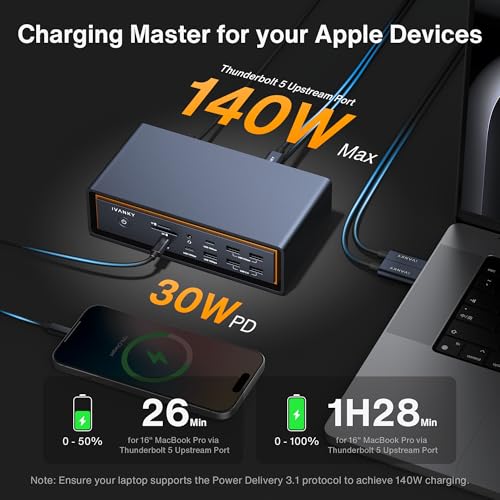
The iVANKY FusionDock Max 2 is a high-performance 23-in-1 docking station designed exclusively for MacBooks. It leverages Thunderbolt 5 for ultra-fast data transfer up to 120Gbps and supports up to triple native displays, with resolutions reaching 6K@60Hz depending on your Mac's M-series chip. Featuring a hybrid cooling system with a fan for sustained performance, it includes 10 USB ports (10Gbps), a 2.5Gbps Ethernet port, and fast SD/TF card readers, along with 140W Power Delivery.
Share
Product Images






Key Recommendations
- Supports up to three native displays with resolutions up to 6K@60Hz for enhanced productivity.
- Features Thunderbolt 5 for exceptionally fast upstream and downstream data transfer speeds up to 120Gbps.
- Offers comprehensive connectivity with 10 USB ports (10Gbps), a 2.5Gbps Ethernet port, and high-speed SD/TF card slots.
- Incorporates a hybrid cooling system with a fan to ensure stable and reliable performance during extended use.
- Provides up to 140W Power Delivery for fast charging of your MacBook.
Points to Consider
- This docking station is not compatible with any Windows or Chrome laptop.
- It is restricted to use with only one Mac at a time and does not support switching between different Macs.
- The maximum display configuration (single, dual, or triple extended displays) varies depending on the specific MacBook M-series chip (e.g., M1/M2/M3 base, Pro, or Max).
Recommended For
- MacBook users seeking to expand their workstation with multiple high-resolution monitors.
- Creative professionals and power users who require high-speed data transfer and extensive peripheral connectivity.
- Users who need a stable and fast 2.5Gbps Ethernet connection.
- MacBook owners looking for a single-cable solution for docking, charging, and connectivity.
Not Recommended For
- Users with Windows laptops.
- Users with Chrome OS devices.
- Individuals who need to share a docking station between Mac and Windows/Chrome devices.
- Users who frequently need to switch the dock between multiple different MacBooks.
よくある質問(Q&A)
Q.Is this docking station compatible with Windows or Chrome laptops?
A.No, the iVANKY FusionDock Max 2 is exclusively designed for MacBooks and is not compatible with Windows or Chrome laptops.
Q.Is this docking station compatible with Windows or Chrome laptops?
A.No, the iVANKY FusionDock Max 2 is exclusively designed for MacBooks and is not compatible with Windows or Chrome laptops.
Q.What are the display capabilities for different Mac M-series chips?
A.Mac series with M1/M2/M3/M4 Max chips support Triple extended displays (Dual 6K@60Hz + Single 4K@60Hz). Mac series with M4/M5 base chips or M1/M2/M3/M4 Pro chips support dual 6K@60Hz displays. Mac series with M1/M2/M3 base chips support a single 6K@60Hz extended display.
Q.What are the display capabilities for different Mac M-series chips?
A.Mac series with M1/M2/M3/M4 Max chips support Triple extended displays (Dual 6K@60Hz + Single 4K@60Hz). Mac series with M4/M5 base chips or M1/M2/M3/M4 Pro chips support dual 6K@60Hz displays. Mac series with M1/M2/M3 base chips support a single 6K@60Hz extended display.
Q.Can I use this dock with multiple MacBooks by switching them?
A.No, the FusionDock Max 2 is restricted to use with only one Mac and does not support switching between other Macs.
Q.Can I use this dock with multiple MacBooks by switching them?
A.No, the FusionDock Max 2 is restricted to use with only one Mac and does not support switching between other Macs.
