
"Amazing sale is here...!" InnoView 2025 Dual Portable Monitor gets a huge 33% off!
Product Overview
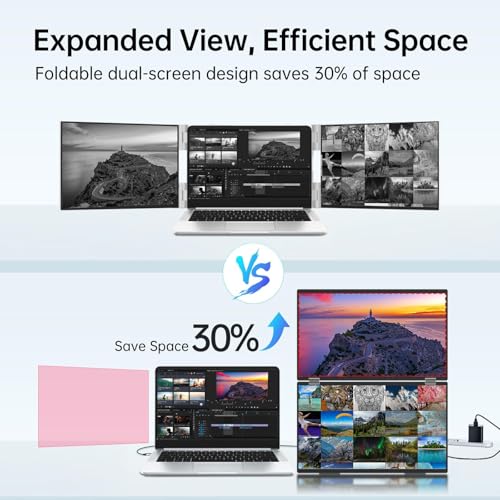
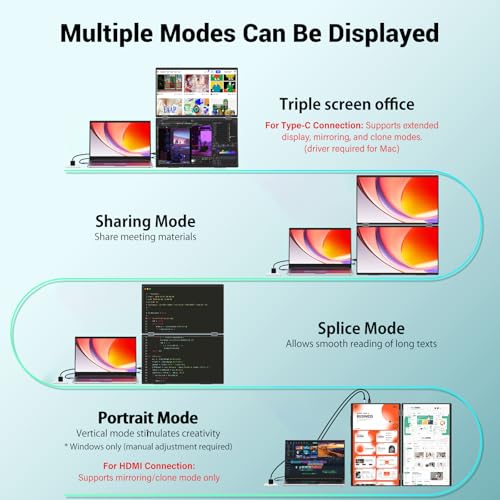
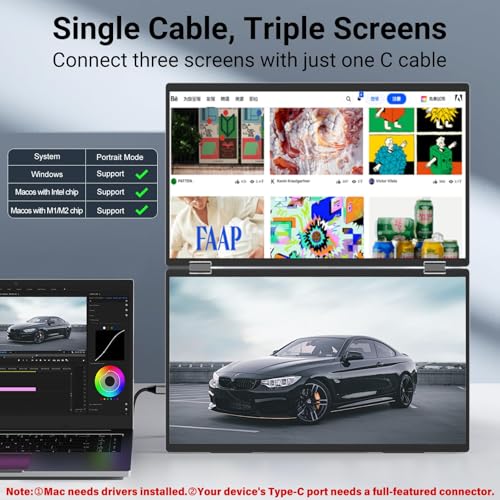
The InnoView 2025 is a portable dual-screen monitor featuring two 15.6-inch IPS panels, each with 1080P FHD resolution. It boasts an all-in-one foldable and stackable design for ultimate portability and space-saving. The monitor offers 315° screen adjustment and 180° stand flexibility, with automatic rotation for optimal viewing on Windows and Mac systems. It supports plug-and-play connectivity for Windows via USB-C, eliminating the need for drivers, and offers multiple display modes including extended, split-screen, and duplicate. For Mac, extended mode requires driver installation. HDMI connectivity is limited to duplicate and split-screen modes. It's powered via a single USB-C cable or an external power source, with a recommendation for a 30W+ supply.
Product Images



Key Recommendations
- Plug-and-Play Simplicity: Seamless extension for Windows laptops via USB-C without drivers.
- Enhanced Productivity: Dual 15.6" FHD IPS screens provide ample space for multitasking, coding, and business applications.
- Ultimate Portability: All-in-one foldable design easily fits into bags for work or travel.
- Flexible Viewing: 315° screen adjustment and 180° stand allow for versatile positioning and collaboration.
- Wide Compatibility: Works with laptops and PCs, supporting various display modes.
- Durable & Supported: Comes with an 18-month warranty for peace of mind.
Points to Consider
- Mac users require driver installation for 'extended' display mode; 'split-screen' and 'duplicate' modes work without drivers.
- HDMI connection supports only 'duplicate' and 'split-screen' modes across all systems.
- Ensure a 30W or higher power source for optimal performance when using external power.
- Use the provided power adapter for power supply.
Recommended For
- Digital nomads and frequent travelers needing a mobile workstation.
- Remote workers and freelancers looking to expand their workspace.
- Programmers and developers who benefit from multiple code displays.
- Students needing extra screen space for research and assignments.
- Professionals managing multiple applications or data streams simultaneously.
- Gamers seeking an additional display for gaming or streaming setup.
Not Recommended For
- Mac users who are unwilling to install drivers for extended display functionality.
- Users who plan to exclusively use an HDMI connection and require an 'extended' desktop setup.
- Individuals seeking a high-refresh-rate, primary gaming monitor.
- Users who prefer a permanent, non-portable monitor setup.
よくある質問(Q&A)
Q.Does this dual monitor work with all laptops?
Q.How is the monitor powered?
Q.Can I use just one of the screens?
Related Articles
![[2025 Edition] 100 Best Monitors! How to Choose and Recommended Models](https://m.media-amazon.com/images/I/51CMlNy3FCL._SL500_.jpg)
Staring at a screen all day? We've rigorously tested the top monitors to bring you crystal-clear clarity and unparalleled comfort, ensuring your viewing experience is second to none.
2025/09/02
![[2025 Edition] 99 Best Video Monitors! Selection Guide and Latest Models Introduction](https://m.media-amazon.com/images/I/41iZ8LaJt2L._SL500_.jpg)
Looking for the best video monitor to elevate your viewing experience? We've rigorously tested top contenders to help you discover the perfect display for gaming, content creation, and everyday use!
2025/08/09
