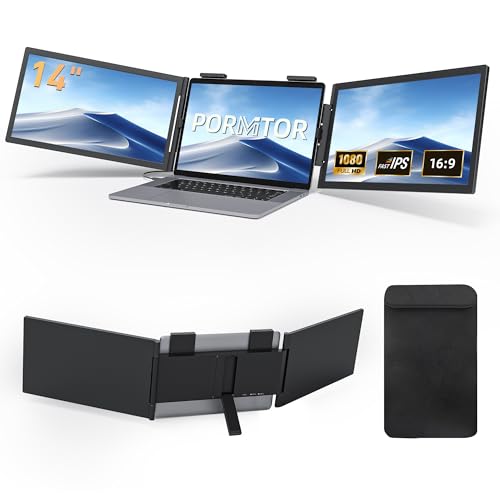
"Boost your productivity, 27% off!" The Pornitor triple laptop monitor extender is a must-have deal.
Product Overview
Transform your workflow with this 14-inch FHD triple laptop monitor extender, designed to boost efficiency by eliminating tab-switching. It features crystal-clear 1080P IPS displays with anti-glare finish for comfortable viewing, and offers seamless plug-and-play setup via a single USB-C cable for most Windows laptops. It's widely compatible across operating systems and supports various display modes to adapt to your needs.
Product Images


Key Recommendations
- Significantly boosts productivity by providing a triple-screen setup.
- Features premium 1080P IPS displays with 300nit brightness and 72% NTSC for sharp, accurate visuals.
- Anti-glare matte finish reduces eye strain during extended use.
- Easy setup with single USB-C cable for most Windows laptops (plug and play).
- Wide compatibility with various operating systems and devices.
- Offers flexible display modes (extended, mirror, portrait) and a 250° adjustable stand for ergonomic comfort.
Points to Consider
- For Windows laptops, a single USB-C cable provides dual displays. If the laptop outputs less than 5V/3A, an extra power connection might be needed.
- For macOS (M1/M2/M3/M4 base models), a single USB-C cable will only mirror one screen; Pro/Max chip laptops require a dual USB-C cable connection for extended display modes.
- Compatible with laptops measuring 14" to 16.5" (laptop width between 12.1"-14.3"). It may not fit 13"-13.9" or 16.5"+ laptops.
- Requires laptops with a full-featured USB-C port supporting DP Alt Mode.
- Optimal support is achieved at a 110° stand angle.
Recommended For
- Developers analyzing code or managing multiple projects.
- Financial traders monitoring market data across several applications.
- Professionals who frequently multitask or use multiple applications simultaneously.
- Content creators and editors needing extended workspace for their tools.
- Students managing research, writing, and online classes.
- Anyone looking to enhance their laptop's multitasking capabilities.
Not Recommended For
- Users with laptops smaller than 14 inches or larger than 16.5 inches (width dependent).
- Users whose laptops do not have a USB-C port with DisplayPort Alternate Mode support.
- Users who require higher resolutions like 4K for professional graphics-intensive work.
- Users looking for a standalone monitor solution, not an add-on for a laptop.
よくある質問(Q&A)
Q.What kind of USB-C port do I need for this monitor extender?
Q.Will this work with my 13-inch MacBook Air?
Q.Can I use this with a non-USB-C laptop?
Q.What is the warranty period?
Q.Does it support touch input?
Related Articles
![[2025 Edition] 100 Best Monitors! How to Choose and Recommended Models](https://m.media-amazon.com/images/I/51CMlNy3FCL._SL500_.jpg)
Staring at a screen all day? We've rigorously tested the top monitors to bring you crystal-clear clarity and unparalleled comfort, ensuring your viewing experience is second to none.
2025/09/02
![[2025 Edition] 99 Best Video Monitors! Selection Guide and Latest Models Introduction](https://m.media-amazon.com/images/I/41iZ8LaJt2L._SL500_.jpg)
Looking for the best video monitor to elevate your viewing experience? We've rigorously tested top contenders to help you discover the perfect display for gaming, content creation, and everyday use!
2025/08/09
