
acer
"Amazing deal alert!" Acer Chromebook slashed by 36% on Amazon!
Amazon商品名: acer Gateway Chromebook 314 CBO314-1H-C476 Laptop | Intel Celeron N4500 | 14" Full HD (1920 x 1080) Display | 4GB LPDDR4X | 64GB eMMC | Wi-Fi 5 802.11ac | Chrome OS | Star Black
$159.992025-11-14 Amazon price
Buy on AmazonGrab the Acer Gateway Chromebook 314 at an incredible 36% discount! This versatile Chrome OS laptop offers speed, security, and access to all your favorite apps. A must-have for students and professionals alike.
Product Overview
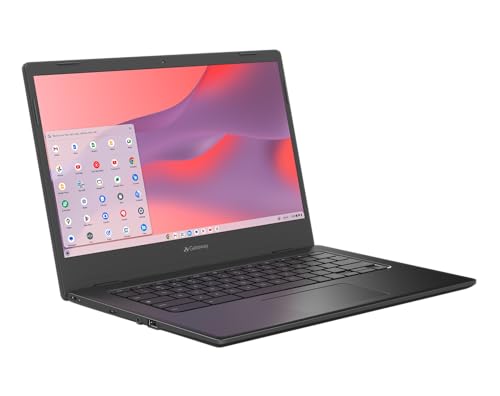
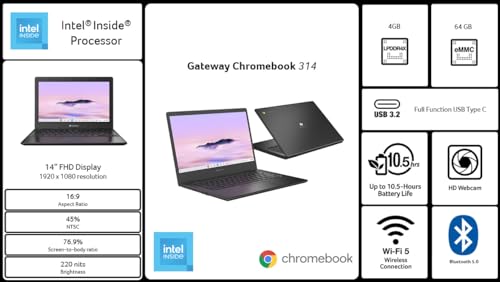
The Acer Gateway Chromebook 314 is a versatile and budget-friendly laptop designed for everyday tasks, featuring the efficient ChromeOS. It boasts a 14-inch Full HD display, powered by an Intel Celeron N4500 processor, 4GB of LPDDR4X RAM, and 64GB of eMMC storage. Ideal for students, casual users, and those who rely on cloud-based applications, this Chromebook offers fast boot times, robust security, and a long-lasting battery life, making it a convenient companion for productivity and entertainment on the go.
Share
Product Images




Key Recommendations
- Runs ChromeOS, the fast, secure operating system from Google, with built-in Google apps like Gmail, Gemini, Docs, and Photos.
- Includes a 3-month trial of Google AI Pro and 2TB of storage.
- Starts up in under 10 seconds and performs automatic updates for sustained performance.
- Features built-in protection and the Titan C2 security chip, offering peace of mind against viruses.
- Access to a wide range of apps from Google Play, including Microsoft 365.
- Offers up to 10.5 hours of battery life for all-day use.
- Features a 14-inch Full HD Widescreen ComfyView Display for clear visuals.
Points to Consider
- Gemini AI feature requires an internet connection, and its responses should be checked for accuracy. Availability may vary by device, country, and language.
- Full functionality of Microsoft 365 may require a separate subscription.
- The system is optimized for cloud-based tasks; performance may be limited for extremely demanding offline applications.
- While ChromeOS has a strong security record, the disclaimer notes 'As of February 2025 there has been no evidence of any documented, successful virus attack on ChromeOS', implying ongoing monitoring.
- Specifications like the Celeron processor and 64GB eMMC storage are suitable for everyday tasks but may not be ideal for heavy multitasking or resource-intensive professional software.
Recommended For
- Students requiring a reliable and affordable device for schoolwork, research, and online learning.
- Users who primarily utilize Google Workspace (Gmail, Docs, Sheets, Drive) and web-based applications.
- Individuals seeking a simple, secure, and fast laptop for everyday tasks like browsing, email, social media, and streaming.
- Budget-conscious consumers looking for an entry-level laptop.
- Users who prefer a lightweight and portable device for on-the-go computing.
Not Recommended For
- Professional content creators (video editors, graphic designers, 3D artists) who need high-performance hardware.
- Hardcore gamers who require powerful graphics cards and processors for demanding titles.
- Users who rely heavily on specific Windows or macOS desktop applications that are not available on Chrome OS.
- Individuals who need extensive offline software capabilities or large local storage for large applications and files.
- Users who demand top-tier processing power for complex simulations or data analysis.
よくある質問(Q&A)
Q.What is Chrome OS and how does it differ from Windows or macOS?
A.ChromeOS is a lightweight, cloud-centric operating system developed by Google. It's known for its speed, simplicity, robust security, and automatic updates. Unlike Windows or macOS, it primarily runs web applications, Android apps from the Google Play Store, and Linux apps, rather than traditional desktop software. This makes it very efficient and less prone to viruses.
Q.What is Chrome OS and how does it differ from Windows or macOS?
A.ChromeOS is a lightweight, cloud-centric operating system developed by Google. It's known for its speed, simplicity, robust security, and automatic updates. Unlike Windows or macOS, it primarily runs web applications, Android apps from the Google Play Store, and Linux apps, rather than traditional desktop software. This makes it very efficient and less prone to viruses.
Q.Can I install and run Microsoft Office applications on this Chromebook?
A.You can access Microsoft 365 through its web-based version (Office Online) or by downloading the Microsoft 365 Android app from the Google Play Store. Some advanced features or full desktop versions of Office applications may require a separate Microsoft 365 subscription and might not offer the exact same functionality as on Windows or macOS.
Q.Can I install and run Microsoft Office applications on this Chromebook?
A.You can access Microsoft 365 through its web-based version (Office Online) or by downloading the Microsoft 365 Android app from the Google Play Store. Some advanced features or full desktop versions of Office applications may require a separate Microsoft 365 subscription and might not offer the exact same functionality as on Windows or macOS.
Q.What is eMMC storage and how does it compare to an SSD?
A.eMMC (embedded MultiMediaCard) is a type of flash memory storage commonly used in budget laptops and smartphones. It's generally slower and less durable than an SSD (Solid State Drive), but it is more cost-effective and consumes less power. For typical Chromebook usage like web browsing and document editing, 64GB of eMMC is usually sufficient.
Q.What is eMMC storage and how does it compare to an SSD?
A.eMMC (embedded MultiMediaCard) is a type of flash memory storage commonly used in budget laptops and smartphones. It's generally slower and less durable than an SSD (Solid State Drive), but it is more cost-effective and consumes less power. For typical Chromebook usage like web browsing and document editing, 64GB of eMMC is usually sufficient.
Q.Is this Chromebook suitable for gaming?
A.This Chromebook is suitable for casual gaming, especially Android games available on the Google Play Store. However, it is not designed for high-end PC gaming due to its Intel Celeron processor and integrated graphics. Demanding PC games will likely not run smoothly or at all.
Q.Is this Chromebook suitable for gaming?
A.This Chromebook is suitable for casual gaming, especially Android games available on the Google Play Store. However, it is not designed for high-end PC gaming due to its Intel Celeron processor and integrated graphics. Demanding PC games will likely not run smoothly or at all.
Q.How long does the battery typically last?
A.The Acer Gateway Chromebook 314 is rated to provide up to 10.5 hours of battery life. Actual battery life may vary depending on usage, such as screen brightness, Wi-Fi usage, and the applications being run.
Q.How long does the battery typically last?
A.The Acer Gateway Chromebook 314 is rated to provide up to 10.5 hours of battery life. Actual battery life may vary depending on usage, such as screen brightness, Wi-Fi usage, and the applications being run.
![[2025 Edition] 100 Best Traditional Laptops! Selection Guide and Latest Models Introduction](https://m.media-amazon.com/images/I/41oR56cfBGL._SL500_.jpg)
