
"Incredible savings!" Redalf's 15.6" portable triple monitor is now 25% off!
Product Overview
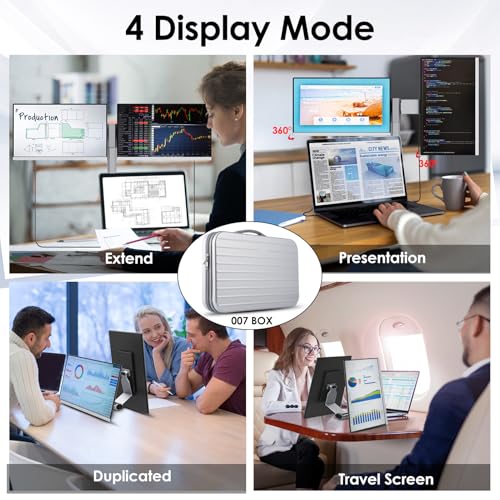
This is a 15.6-inch portable triple monitor extender designed to enhance laptop productivity. It features a Full HD (1920*1080) IPS Matte screen with advanced eye-care technology and 360° rotation capabilities. Its lightweight and ergonomic design makes it ideal for on-the-go use, offering plug-and-play connectivity via two Type-C ports and one mini HDMI port for seamless integration with most devices.
Product Images


Key Recommendations
- Boost productivity with a triple-screen setup.
- Enhance multitasking and workflow efficiency.
- Lightweight and portable design for on-the-go use.
- Eye-care features with reduced blue light and flicker-free technology.
- Flexible viewing angles with 360° rotation and multiple display modes.
- Easy setup with plug-and-play functionality via Type-C or HDMI.
- Wide compatibility with various operating systems and devices.
Points to Consider
- Ensure your device supports Thunderbolt 3.0/4.0 or USB 3.1 Type-C DP ALT-MODE for Type-C connection.
- Some laptops may have port limitations; contact support if connection issues arise.
- Not compatible with MacBooks equipped with the standard M1/M2/M3 chip (only Pro/Max variants).
- Handle with care to avoid damage during transport.
- Use the provided cables for optimal performance.
Recommended For
- Professionals who need to multitask extensively.
- Students requiring multiple screens for research and study.
- Remote workers seeking to optimize their home or mobile office setup.
- Content creators and developers who benefit from expanded screen real estate.
- Frequent travelers who need a portable productivity solution.
Not Recommended For
- Users with MacBooks equipped with standard M1, M2, or M3 chips.
- Users whose devices do not support DisplayPort Alternate Mode over USB-C.
- Gamers primarily focused on high refresh rates or specialized gaming features.
- Users looking for a primary, standalone desktop monitor.
よくある質問(Q&A)
Q.How do I connect this monitor to my laptop?
Q.Is this monitor compatible with my MacBook?
Q.What is the screen resolution and size?
Q.Can I use this monitor as a standalone display without my laptop?
Q.What is the warranty period?
Q.What does '360° rotation' mean for the screens?
Related Articles
![[2025 Edition] 100 Best Monitors! How to Choose and Recommended Models](https://m.media-amazon.com/images/I/51CMlNy3FCL._SL500_.jpg)
Staring at a screen all day? We've rigorously tested the top monitors to bring you crystal-clear clarity and unparalleled comfort, ensuring your viewing experience is second to none.
2025/09/02
![[2025 Edition] 99 Best Video Monitors! Selection Guide and Latest Models Introduction](https://m.media-amazon.com/images/I/41iZ8LaJt2L._SL500_.jpg)
Looking for the best video monitor to elevate your viewing experience? We've rigorously tested top contenders to help you discover the perfect display for gaming, content creation, and everyday use!
2025/08/09
