
HODO
"Grab this tech deal!" HODO USB C Docking Station is now 10% off!
Amazon商品名: USB C Docking Station Dual Monitor Adapter for Dell HP, Laptop Docking Station 3 Monitors Quadruple Display USB C Hub Dongle to 4K HDMI+DisplayPort+VGA,100W PD, 3USB2.0, 8 in 1 Thunderbolt Dock
$27.532026-01-05 Amazon price
Buy on AmazonUpgrade your workstation with the HODO USB C Docking Station! Perfect for Dell and HP laptops, this versatile hub is now on sale with a 10% discount. Grab this limited-time offer to enhance your setup.
Product Overview
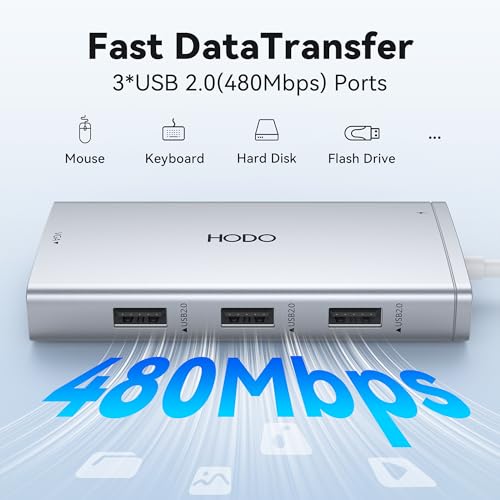
The HODO 8-in-1 USB C Docking Station expands your laptop's capabilities with multiple display outputs and essential ports. It offers dual HDMI, DisplayPort, and VGA for versatile monitor configurations, up to 4K resolution support (with caveats for VGA and macOS), three USB 2.0 ports for peripherals, and a 100W USB-C Power Delivery port for charging. Designed for laptops with full-featured USB-C ports.
Share
Product Images


Key Recommendations
- Expand your laptop's connectivity with 8 essential ports.
- Support for dual or triple displays for enhanced productivity.
- High-speed data transfer for peripherals like keyboards and mice via USB 2.0.
- Fast charging capabilities with up to 100W PD support.
- Wide compatibility with popular laptop brands like Dell, HP, and MacBook.
Points to Consider
- On macOS, external monitor screens will be the same in mirror or extended mode.
- If the VGA port is connected, it limits all display resolutions to 1080P.
- Laptop's USB-C port must support DisplayPort Alternate Mode (DP Alt Mode) and Power Delivery (PD) protocol.
- Use at least a 65W power adapter (not included) for charging. Lower wattage may cause system warnings.
- Power cord is not included.
- Ensure your laptop supports DP1.4 signal output for optimal 4K resolution on certain displays.
Recommended For
- Users needing to connect multiple monitors to their laptop.
- Professionals who require extensive peripheral connectivity (keyboard, mouse, external drives).
- Laptop users seeking a versatile docking solution for Dell, HP, Lenovo, MacBook, and Surface devices.
- Students and remote workers creating a more functional workstation.
Not Recommended For
- Users with older laptops that do not have a full-featured USB-C port (e.g., only for charging or basic data).
- Users who need high-speed USB ports (e.g., USB 3.0/3.1/3.2) for external SSDs or fast data transfer.
- macOS users expecting independent screen mirroring or extended modes across all connected displays.
- Users who require a built-in power adapter (this hub requires a separate one).
- Users who plan to use the VGA port and still require resolutions above 1080p on other connected displays.
よくある質問(Q&A)
Q.Can this docking station support 3 monitors simultaneously?
A.Yes, it supports up to triple display (Dual HDMI + DisplayPort or Dual HDMI + VGA). However, if the VGA port is used, the resolution for all connected displays will be limited to 1080P. For true 4K resolution on multiple displays, ensure your laptop supports DP1.4 and utilize HDMI and DisplayPort outputs.
Q.Can this docking station support 3 monitors simultaneously?
A.Yes, it supports up to triple display (Dual HDMI + DisplayPort or Dual HDMI + VGA). However, if the VGA port is used, the resolution for all connected displays will be limited to 1080P. For true 4K resolution on multiple displays, ensure your laptop supports DP1.4 and utilize HDMI and DisplayPort outputs.
Q.Does this docking station come with a power adapter?
A.No, the power adapter is not included. You need to use your own USB-C Power Delivery adapter (at least 65W recommended) to charge your laptop through the docking station.
Q.Does this docking station come with a power adapter?
A.No, the power adapter is not included. You need to use your own USB-C Power Delivery adapter (at least 65W recommended) to charge your laptop through the docking station.
Q.Why is my laptop not charging or charging slowly when connected to the dock?
A.Ensure you are using a USB-C power adapter with at least 65W (100W supported by the dock). Also, verify that your laptop's USB-C port supports the Power Delivery (PD) protocol. A lower wattage adapter may cause system warnings or insufficient charging.
Q.Why is my laptop not charging or charging slowly when connected to the dock?
A.Ensure you are using a USB-C power adapter with at least 65W (100W supported by the dock). Also, verify that your laptop's USB-C port supports the Power Delivery (PD) protocol. A lower wattage adapter may cause system warnings or insufficient charging.
Q.Will this docking station work with my MacBook?
A.This docking station is compatible with MacBook Pro/Air models that have a Thunderbolt 3 or Thunderbolt 4 (USB-C) port which supports DisplayPort Alternate Mode. However, please note that on macOS systems, all external monitors will display the same content in mirror mode or extended mode; they cannot be set to independent displays like on some Windows systems.
Q.Will this docking station work with my MacBook?
A.This docking station is compatible with MacBook Pro/Air models that have a Thunderbolt 3 or Thunderbolt 4 (USB-C) port which supports DisplayPort Alternate Mode. However, please note that on macOS systems, all external monitors will display the same content in mirror mode or extended mode; they cannot be set to independent displays like on some Windows systems.
Q.What is the difference between the two HDMI ports?
A.One HDMI port supports 4K@60Hz, while the other supports 4K@30Hz. The DisplayPort also supports 4K@60Hz. The VGA port supports up to 1080P.
Q.What is the difference between the two HDMI ports?
A.One HDMI port supports 4K@60Hz, while the other supports 4K@30Hz. The DisplayPort also supports 4K@60Hz. The VGA port supports up to 1080P.
