
Liene
"Instant photo magic!" Liene's portable printer is now $25 off!
Amazon商品名: Liene Photo Printer, 2x3” Mini Portable Instant Photo Printer Bundle w/ 50 Zink Adhesive Paper, Bluetooth 5.0, Compatible w/iOS & Android, Small Color Mono Picture Printer for iPhone, Smartphone Green
$84.992026-01-08 Amazon price
Buy on AmazonCapture and share your favorite moments instantly with the Liene portable photo printer. This compact device makes printing memories a breeze, now at an incredible $25 discount.
Product Overview
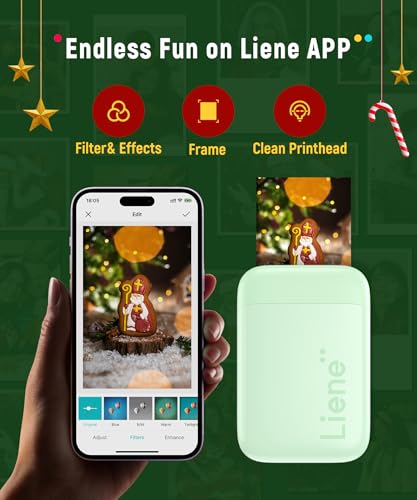
The Liene Photo Printer is a super portable, mini printer designed for on-the-go photo printing. It connects via Bluetooth 5.0 to iOS and Android smartphones, allowing you to easily print 2x3" photos directly from your device. Utilizing Zink technology, it eliminates the need for ink cartridges, relying on special adhesive-backed Zink paper for vibrant, durable prints. The printer features a user-friendly app with a unique print head cleaning function for maintaining photo quality.
Share
Product Images




Key Recommendations
- Ultra-portable and lightweight design, similar to a power bank, making it easy to carry anywhere.
- Seamless Bluetooth 5.0 connectivity for quick and stable pairing with smartphones.
- Ink-free Zink technology eliminates the hassle and cost of ink cartridges, toners, or ribbons.
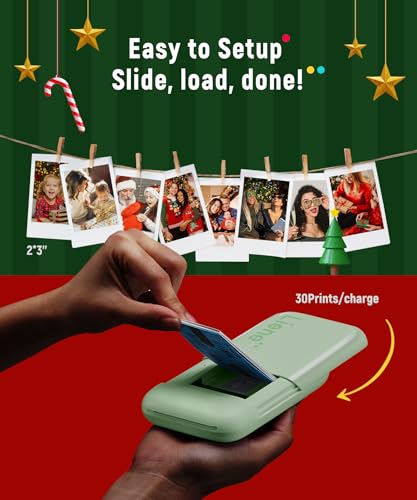
- Produces high-quality, durable, and vibrant 2x3" photos with an adhesive backing for easy application.
- User-friendly Liene app includes a 'clean print head' feature to resolve printing quality issues.
- Convenient Type-C charging method.
- Ideal for printing memories instantly from your phone.
Points to Consider
- Printing requires the dedicated Liene photo app.
- A blue calibration card is necessary for the 'clean print head' function; refer to product videos for guidance.
- Ensure you are using compatible Zink paper for optimal results.
- This printer is designed for smartphone printing; direct PC printing is not supported.
Recommended For
- Smartphone users who want to print photos instantly from their device.
- Travelers and individuals on the go who need a compact printing solution.
- Social media enthusiasts looking to share physical copies of digital moments.
- DIY crafters and scrapbookers who want to add personalized photos to their projects.
- People looking for a unique and convenient gift for friends and family.
Not Recommended For
- Users who require printing of large-format photos or standard document printing.
- Individuals who prefer not to use a smartphone app for their printing needs.
- Professional photographers seeking high-resolution, gallery-quality prints.
- Users who need to print directly from a computer without using a smartphone as an intermediary.
よくある質問(Q&A)
Q.How do I connect the Liene Photo Printer to my smartphone?
A.Ensure Bluetooth is enabled on your smartphone. Open the Liene photo app and follow the on-screen instructions to pair your device with the printer. The printer also features an easy one-hand sliding cover for setup.
Q.How do I connect the Liene Photo Printer to my smartphone?
A.Ensure Bluetooth is enabled on your smartphone. Open the Liene photo app and follow the on-screen instructions to pair your device with the printer. The printer also features an easy one-hand sliding cover for setup.
Q.Does this printer use ink cartridges?
A.No, the Liene Photo Printer uses Zink technology, which means it does not require any ink cartridges, toners, or ribbons. The color is embedded directly into the special Zink paper.
Q.Does this printer use ink cartridges?
A.No, the Liene Photo Printer uses Zink technology, which means it does not require any ink cartridges, toners, or ribbons. The color is embedded directly into the special Zink paper.
Q.What is the size of the photos printed by this device?
A.The printer produces 2x3 inch photos, which are perfect for personal use, decorating, and sharing.
Q.What is the size of the photos printed by this device?
A.The printer produces 2x3 inch photos, which are perfect for personal use, decorating, and sharing.
Q.What should I do if I see white spots or lines on my printed photos?
A.You can use the 'Clean print head' feature available within the Liene photo app. Make sure you have the blue calibration card ready, as it is required for this function. Please refer to the product page videos for a detailed guide.
Q.What should I do if I see white spots or lines on my printed photos?
A.You can use the 'Clean print head' feature available within the Liene photo app. Make sure you have the blue calibration card ready, as it is required for this function. Please refer to the product page videos for a detailed guide.
Q.Can I print photos directly from my computer?
A.This portable printer is designed specifically for printing from iOS and Android smartphones via Bluetooth using the Liene app. It does not support direct printing from computers.
Q.Can I print photos directly from my computer?
A.This portable printer is designed specifically for printing from iOS and Android smartphones via Bluetooth using the Liene app. It does not support direct printing from computers.
