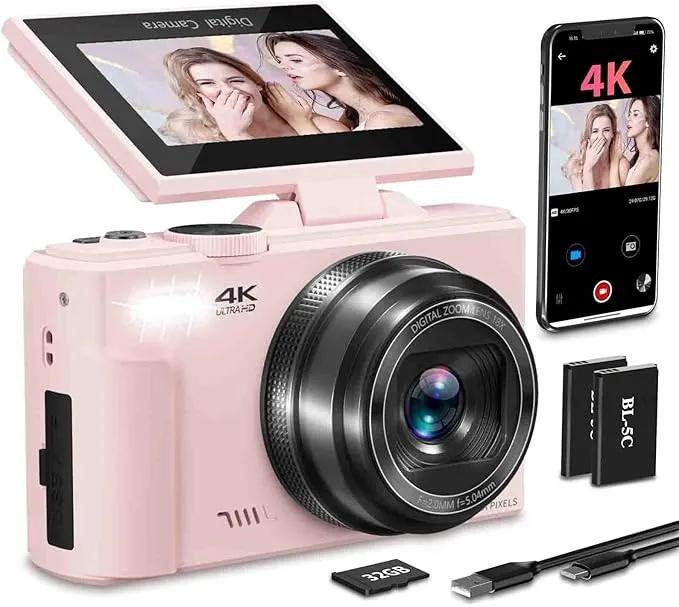
NIKICAM W08 4K Digital Camera
Rating
Product Overview
The NIKICAM W08 is an entry-level 4K digital camera aimed at beginners and casual users, particularly those interested in vlogging and selfies due to its 3-inch 180° flip screen. It boasts 64MP photo resolution and 4K video recording at 30FPS, along with 18X digital zoom and built-in flash. Features like Wi-Fi connectivity for easy transfer to smartphones and webcam functionality add to its versatility. It comes with a 32GB TF card and two batteries, offering a complete package for its affordable price point.
Specifications
| Sensor Size | 1/2.5-inchinch |
|---|---|
| Effective Megapixels | 64MP |
| Maximum ISO Sensitivity | 25600ISO |
| Max Video Resolution | 3840 x 2160 (4K)pixels |
| Continuous Shooting Speed | - fps |
| Autofocus Points | - points |
| Image Stabilization Type | Digital |
| Display Size | 3.0inches |
| Battery Life | - shots |
| Lens Mount Type | Fixed |
| Memory Card Slots | 1slots |
| Unit Weight | - g |
Dimensions & Weight
機能一覧
This function uses a mechanism within the camera body to automatically compensate for camera shake. It is particularly useful when shooting handheld in dimly lit environments, using longer lenses, or when recording video while moving. Users benefit from capturing sharper photos and smoother videos without needing special lenses, making it easier to achieve clear and steady results in various situations.
The camera features digital image stabilization, which attempts to smooth out shaky footage electronically. However, it does not have a mechanical in-body image stabilization (IBIS) system. Digital stabilization is generally less effective than optical or sensor-shift methods, meaning users may still experience noticeable camera shake, especially in challenging shooting conditions or when recording video handheld.
This function allows the camera's display screen to pivot and rotate in multiple directions. It is highly beneficial when composing shots from challenging angles, such as shooting over a crowd, from very low to the ground, or for self-portraits and vlogging. This flexibility enhances shooting comfort and allows for creative framing, improving the overall ease of capturing unique perspectives.
Yes, the NIKICAM W08 is equipped with a 3.0-inch LCD screen that can flip 180 degrees. This highly flexible design is ideal for self-recording, vlogging, and capturing shots from unusual angles (e.g., low to the ground or over a crowd), significantly enhancing the user's ability to frame shots comfortably and creatively without needing to guess.
This function incorporates specialized seals and construction to provide enhanced resistance against dust and moisture entering the camera body. It is valuable when shooting outdoors in light rain, windy conditions with dust, or near splashing water. Users gain peace of mind and the ability to continue shooting in more varied environmental conditions without concern for potential damage to the camera.
The product information explicitly states "Water Resistance Level: Not Water Resistant," indicating that the camera does not feature any weather sealing. This means the camera is vulnerable to dust, moisture, and splashes, and should not be used in adverse environmental conditions like rain, heavy humidity, or dusty environments to prevent potential damage.
This function enables the camera's internal battery to be charged directly by connecting the camera to a standard USB power source, such as a power bank, a computer's USB port, or a wall adapter. It is incredibly convenient for travel when you might not have access to the dedicated battery charger, or when you need to quickly top up your battery using readily available power sources. This offers flexible and easy charging on the go.
The camera supports charging via a Type-C USB cable. This allows for convenient charging using various power sources such as a computer, a power bank, or a standard USB wall adapter, making it easy to keep the camera powered up on the go without needing a proprietary charger. It also facilitates direct data transfer to a computer.
This function provides a dedicated port on the camera to connect an external microphone. It is essential for users who record videos and require significantly better audio quality than the camera's built-in microphone can provide, such as for interviews, vlogs, or capturing clearer ambient sounds. This feature dramatically enhances the overall professional quality and clarity of your video content.
The camera does not have a hot shoe connector, which is a common interface for external microphones on many cameras. While it's not explicitly stated if there's a 3.5mm audio jack, the lack of a hot shoe and user complaints about "terrible sound quality" strongly suggest there is no provision for connecting an external microphone, severely limiting audio recording capabilities for video.
This function allows the camera to wirelessly connect to other devices, such as smartphones, tablets, or computers, for easy photo and video transfer, as well as remote camera control. It is ideal for quickly sharing your images to social media from your phone or for capturing group photos and wildlife shots from a distance. This provides convenient and fast content sharing and flexible camera operation without the need for cables.
The NIKICAM W08 includes built-in Wi-Fi functionality. This allows users to wirelessly connect the camera to a smartphone or tablet, enabling remote control of the camera and convenient transfer of photos and videos for instant sharing on social media or backup. This feature enhances usability and connectivity in a modern workflow.
SHOPSTAFF Rating Score
The NIKICAM W08 is positioned as an ultra-affordable digital camera, offering headline features like 4K video and 64MP photos at a very low price. However, its performance limitations are significant, particularly in video and audio quality, which are often described as poor by users. The small sensor size and basic autofocus system mean it struggles in anything less than optimal lighting. While it's a functional camera for basic, casual use, its durability and long-term performance are questionable given its budget construction. It serves as a stepping stone for absolute beginners but will quickly be outgrown by anyone seeking decent quality.
Brand & Manufacturer Details
Key Recommendations
- Extremely affordable price point for a 4K-capable camera
- Convenient 180° flip screen ideal for selfies and vlogging
- Includes a 32GB TF card and 2 batteries, offering good value in the package
- Built-in Wi-Fi for easy photo/video transfer to smartphones
- Can be used as a webcam for live streaming or video calls
Points to Consider
- Video quality is often reported as poor, especially in non-optimal lighting conditions
- Audio quality for video recording is very low and tinny, making it unsuitable for serious vlogging
- No external microphone input, limiting audio improvement options
- Autofocus can be slow and struggle to adjust to light changes
- Not water resistant; avoid use in rain or humid environments
- Build quality is basic and may not withstand rough handling
Recommended For
- Absolute beginners to photography and videography
- Children or teenagers looking for a first camera
- Individuals on an extremely tight budget needing basic photo/video capture
- Casual users who prioritize affordability over image/audio quality
- Those needing a simple webcam for occasional use
Not Recommended For
- Serious vloggers or content creators requiring high-quality video and audio
- Photographers seeking excellent image quality, especially in low light
- Users who need interchangeable lenses or advanced manual controls
- Anyone expecting professional-grade results or robust build quality
- Users who frequently shoot in challenging lighting or dynamic environments
Recommended Use Cases
- Casual outdoor photography in bright, well-lit conditions
- Basic vlogging or selfie recording in controlled, well-lit indoor settings
- Family gatherings or simple everyday snapshots
- As a temporary or backup webcam for video calls
- Learning basic camera operation for beginners
Not Recommended Use Cases
- Professional video production or vlogging where audio quality is critical
- Low-light photography or videography
- Action or sports photography requiring fast autofocus and burst shooting
- Outdoor shooting in rain, dust, or harsh weather conditions
- Situations requiring high-fidelity images for printing or large displays