
ASUS Vivobook Go L210KA-ES04
Rating
Product Overview
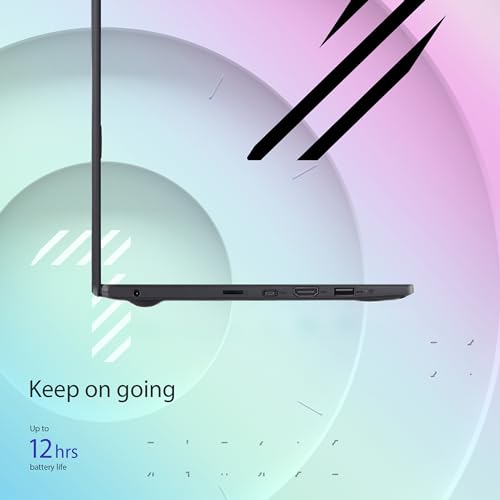
The ASUS Vivobook Go L210KA-ES04 is an 11.6-inch HD slim laptop featuring an Intel Celeron N4500 processor, Intel Graphics, 4GB of RAM, and a 128GB SSD. It comes with Windows 11 Home and includes SonicMaster audio and an ErgoSense keyboard. The lightweight design makes it ideal for travel and basic computing tasks. It offers Bluetooth connectivity, a built-in webcam, and a long battery life, making it suitable for students and users needing a portable device for everyday use.
Product Images




Specifications
| Processor Model | Intel Celeron N4500 |
|---|---|
| Memory Capacity | 4GB |
| Storage Capacity | 128GB |
| Storage Type | SSD |
| Display Size | 11.6inch |
| Display Resolution | HD (1366x768) |
| Graphics Card Model | Intel HD Graphics |
| Operating System | Windows 11 Home |
| Unit Weight | 1.07kg |
| Battery Life | 12hours |
| USB Port Count | 3 |
| HDMI Port Count | 1 |
| Wi-Fi Standard | Wi-Fi 5 (802.11ac) |
| Bluetooth Version | Bluetooth 4.2 |
Dimensions & Weight
機能一覧
A function that allows you to log in to your computer or authenticate your identity by simply placing your finger on a designated sensor. This is useful when you want quick and secure access to your laptop without typing passwords or PINs, especially in public or shared environments. It provides a convenient and enhanced layer of personal security, ensuring only authorized users can access your device.
This budget-friendly laptop does not include a fingerprint authentication function. Users will need to rely on traditional password or PIN methods for logging into the device, which is a common characteristic for laptops in this entry-level price segment, prioritizing cost-effectiveness over advanced biometric security features.
A function that illuminates the keys on the keyboard from underneath. This is particularly useful when you are working in dimly lit environments, such as during night-time, on an airplane, or in a dark room. It allows for comfortable and accurate typing, reducing eye strain and improving productivity without needing external light sources.
This laptop features a backlit keyboard, which is a significant advantage for typing in dimly lit environments. This functionality enhances visibility of the keys, allowing for more comfortable and accurate input during evening hours or in poorly lit spaces, improving overall user experience for productivity and casual use.
A function that provides a physical sliding cover or built-in shutter that can block the laptop's integrated webcam lens. This is useful for ensuring your privacy when the camera is not in use, preventing unintended or unauthorized viewing. It offers peace of mind, protecting your personal space from potential unwanted observation.
A physical webcam privacy shutter is not explicitly mentioned in the product information. While the laptop does have a webcam, users who prioritize privacy may need to consider alternative methods, such as software-based controls or external covers, to ensure the camera lens is blocked when not in use.
A function that enables the laptop's battery to charge to a significant percentage in a short amount of time. This is highly beneficial when you need to quickly power up your laptop before leaving home, during a short break between meetings, or when power outlets are scarce. It minimizes downtime and ensures your laptop is ready for use much faster than standard charging.
The product information does not explicitly state whether this laptop supports fast charging. Users should expect standard charging speeds, which means a full battery recharge may take a few hours. This might require planning for charging times, especially for users who frequently need quick power top-ups on the go.
A function that allows you to interact directly with the laptop screen using your fingers, similar to a smartphone or tablet. This is convenient for quick navigation, scrolling, drawing, taking notes with a stylus (if supported), or interacting with applications directly on the display. It offers intuitive control and enhances versatility for creative work or casual browsing.
This laptop features a traditional non-touch display, meaning interaction is primarily through the keyboard and trackpad. It is designed for a conventional laptop experience, focusing on productivity tasks that benefit from physical input methods rather than direct screen interaction, which helps maintain its affordable price point.
A function that allows the laptop's screen to fold back or detach, transforming the device into various configurations such as a tablet, tent, or stand mode. This is useful for adapting your laptop to different scenarios, like presenting content to a small group, watching movies in a cramped space, or using it in a tablet-like fashion for reading or sketching. It provides enhanced flexibility and adaptability for diverse tasks and viewing preferences.
As a traditional clamshell laptop, this model does not feature a convertible design. The screen is fixed and cannot be folded back or detached to transform into a tablet or tent mode. This design choice prioritizes a stable and straightforward laptop form factor, suitable for users who prefer a conventional computing setup.
SHOPSTAFF Rating Score
The ASUS Vivobook Go L210KA-ES04 is positioned as an ultra-affordable, highly portable laptop for basic computing needs. Its Intel Celeron N4500 processor and 4GB RAM are sufficient for web browsing, email, and light document work, but users should expect significant performance limitations for anything beyond these tasks, including noticeable lag and freezing as reported by some users, especially when exiting S-mode or installing applications. This clearly differentiates it from higher-end models designed for multitasking or demanding software. Given its price point, it offers a functional entry into the Windows 11 ecosystem, though its predicted usage period might be limited by its low-end specifications as software demands increase. Durability is standard for its class, but the 12% lowest quality ratings suggest a higher risk of encountering issues.
Brand & Manufacturer Details
Key Recommendations
- Extremely lightweight and compact design, making it highly portable for students and travelers.
- Impressive battery life of up to 12 hours, allowing for extended use away from power outlets.
- Highly competitive price point, offering a functional Windows 11 laptop for under $230.
- SSD storage ensures faster boot times and application loading compared to traditional HDDs.
- Includes a backlit keyboard, a valuable feature often absent in this price range.
Points to Consider
- Performance is limited to basic tasks; it will struggle with heavy multitasking, demanding applications, or gaming.
- Windows 11 Home in S Mode restricts app installations to the Microsoft Store, requiring a one-way switch to regular Windows 11 for broader software compatibility, which can be slow and problematic.
- Limited 128GB storage capacity necessitates careful file management or reliance on cloud/external storage.
- The HD display is basic and lacks the sharpness and vibrancy of higher-resolution screens.
- Some user reports indicate potential for lag, freezing, and system reboots, suggesting possible quality control inconsistencies.
Recommended For
- Students needing a very lightweight and affordable laptop for note-taking, online classes, and basic assignments.
- Users who primarily need a device for web browsing, email, and word processing.
- Individuals seeking a highly portable secondary laptop for travel or casual use.
- Children or elderly users who require a simple, easy-to-use computer for basic digital tasks.
- Budget-conscious consumers who prioritize portability and battery life over raw performance.
Not Recommended For
- Users requiring powerful performance for demanding software like video editing, graphic design, or complex programming.
- Gamers looking to play modern, graphically intensive video games.
- Individuals who frequently multitask with many applications open simultaneously.
- Users who need ample local storage for large files, extensive software libraries, or multimedia collections.
- Anyone expecting a high-resolution, vibrant display for detailed visual work or immersive media consumption.
Recommended Use Cases
- Attending online lectures or virtual meetings from various locations.
- Working on documents, spreadsheets, and presentations in cafes, libraries, or during commutes.
- Casual web browsing, social media, and email checking at home or on the go.
- Streaming movies and TV shows during travel or in bed.
- Lightweight travel companion for basic productivity and entertainment.
Not Recommended Use Cases
- Running professional-grade creative software such as Adobe Photoshop, Premiere Pro, or AutoCAD.
- Playing modern AAA video games or even moderately demanding indie titles.
- Developing complex software, compiling large codebases, or running virtual machines.
- Performing intensive data analysis or scientific simulations.
- Using as a primary workstation for heavy, continuous workload requiring high responsiveness.