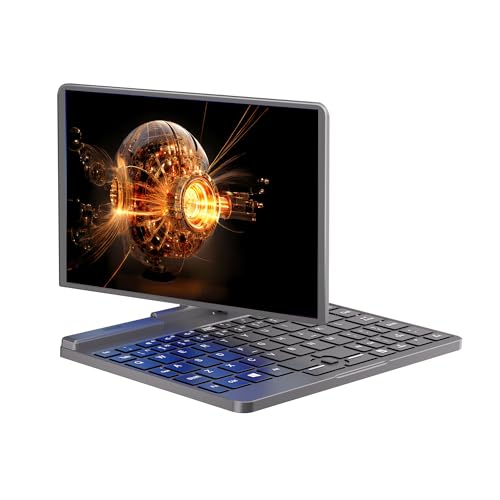
Ruchonin Mini Laptop PC All Metal 8-Inch Touchscreen Gaming Notebook Computer Intel 12th Gen CPU Alder Lake-N N100 Windows 11 12G RAM/1TB SSD with Webcam
Rating
Product Overview
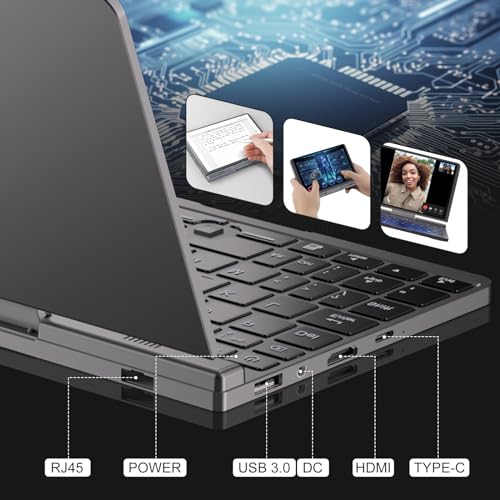
The Ruchonin Mini Laptop PC is an 8-inch mini laptop featuring an Intel 12th Gen Alder Lake-N N100 processor, 12GB of DDR5 RAM, and a 1TB SSD. It runs Windows 11 and has a touchscreen display that can rotate 180 degrees for tablet use. The device includes a webcam, Bluetooth 5.2, Wi-Fi 6, and multiple ports. It's designed for portability and suitable for light gaming, multimedia, and business tasks. The all-metal body provides durability, and the compact size makes it easy to carry.
Product Images




Specifications
| Processor Model | Intel Alder Lake-N N100 |
|---|---|
| Memory Capacity | 12GB |
| Storage Capacity | 1000GB |
| Storage Type | SSD |
| Display Size | 8inch |
| Display Resolution | 1600 x 1200 |
| Graphics Card Model | Intel HD Graphics |
| Operating System | Windows 11 |
| Unit Weight | 0.78kg |
| Battery Life | 5hours |
| USB Port Count | 2 |
| HDMI Port Count | 1 |
| Wi-Fi Standard | Wi-Fi 6 |
| Bluetooth Version | Bluetooth 5.2 |
Dimensions & Weight
機能一覧
A function that allows you to log in to your computer or authenticate your identity by simply placing your finger on a designated sensor. This is useful when you want quick and secure access to your laptop without typing passwords or PINs, especially in public or shared environments. It provides a convenient and enhanced layer of personal security, ensuring only authorized users can access your device.
This mini laptop does not include a fingerprint authentication function. Users will need to rely on traditional password or PIN methods for logging in, which is common for devices in this compact and budget-oriented category. The absence of this feature means quick, biometric login is not an option, requiring manual input of credentials for security.
A function that illuminates the keys on the keyboard from underneath. This is particularly useful when you are working in dimly lit environments, such as during night-time, on an airplane, or in a dark room. It allows for comfortable and accurate typing, reducing eye strain and improving productivity without needing external light sources.
The product information does not indicate the presence of a backlit keyboard. This means the keys will not illuminate, which might make typing in low-light environments challenging and could impact productivity for users who frequently work in such conditions. Users will need external light sources or rely on ambient lighting for visibility.
A function that provides a physical sliding cover or built-in shutter that can block the laptop's integrated webcam lens. This is useful for ensuring your privacy when the camera is not in use, preventing unintended or unauthorized viewing. It offers peace of mind, protecting your personal space from potential unwanted observation.
There is no mention of a physical webcam privacy shutter on this device. While it features a built-in HD camera for video calls, users concerned about privacy will need to rely on software solutions or external covers to ensure the camera lens is blocked when not in use. This might be a minor inconvenience for privacy-conscious individuals.
A function that enables the laptop's battery to charge to a significant percentage in a short amount of time. This is highly beneficial when you need to quickly power up your laptop before leaving home, during a short break between meetings, or when power outlets are scarce. It minimizes downtime and ensures your laptop is ready for use much faster than standard charging.
This laptop supports PD fast charging with a 30W or higher power supply, allowing for quicker battery top-ups. This feature is highly convenient for users who need to rapidly charge their device before heading out or during short breaks, minimizing downtime and enhancing portability. It ensures the device is ready for use much faster than standard charging methods.
A function that allows you to interact directly with the laptop screen using your fingers, similar to a smartphone or tablet. This is convenient for quick navigation, scrolling, drawing, taking notes with a stylus (if supported), or interacting with applications directly on the display. It offers intuitive control and enhances versatility for creative work or casual browsing.
Equipped with a 10-point capacitive touchscreen, this mini laptop offers intuitive interaction, allowing users to navigate, scroll, and interact with applications directly on the display. It also supports an active stylus (sold separately), enhancing its versatility for note-taking or drawing, making it a highly interactive and flexible device for various tasks.
A function that allows the laptop's screen to fold back or detach, transforming the device into various configurations such as a tablet, tent, or stand mode. This is useful for adapting your laptop to different scenarios, like presenting content to a small group, watching movies in a cramped space, or using it in a tablet-like fashion for reading or sketching. It provides enhanced flexibility and adaptability for diverse tasks and viewing preferences.
The laptop features a 2-in-1 convertible design with a 180-degree rotating screen, allowing it to transform into a tablet. This flexibility is ideal for various uses, from traditional laptop mode for typing to tablet mode for media consumption, reading, or stylus-based tasks, adapting to different user needs and environments and maximizing its utility.
SHOPSTAFF Rating Score
The Ruchonin Mini Laptop is a niche 2-in-1 device designed for extreme portability, featuring an 8-inch convertible touchscreen. It is powered by an Intel N100 CPU and a generous 12GB RAM with a 1TB SSD, offering capable performance for basic productivity, web browsing, and light entertainment. However, its performance limitations mean it is not suited for demanding applications or heavy multitasking. Compared to higher-end laptops, it sacrifices screen size and keyboard comfort for its ultra-compact form factor. The predicted usage period and durability are uncertain due to the emerging brand's inconsistent customer reviews, with some users reporting significant out-of-box issues. It excels in scenarios where a full Windows environment is needed in a tablet-like size, but its non-standard keyboard and potential reliability concerns are notable drawbacks.
Brand & Manufacturer Details
Key Recommendations
- Highly portable and compact 8-inch convertible design, ideal for on-the-go use.
- Generous 12GB DDR5 RAM and 1TB SSD provide excellent storage and smooth performance for light tasks.
- High-resolution 1600x1200 IPS touchscreen with stylus support offers versatile interaction.
- Supports modern Wi-Fi 6 and Bluetooth 5.2 for fast and reliable wireless connectivity.
- PD fast charging capability allows for quick power top-ups.
Points to Consider
- The non-standard keyboard layout and optical finger navigation "nub" can make typing and precise cursor control challenging.
- Limited battery life (4-6 hours) requires frequent charging for extended mobile use.
- As an emerging brand, there are reported quality control issues, including screen glitches and startup problems, which may affect long-term reliability.
- Not suitable for resource-intensive applications like video editing, complex graphic design, or demanding modern games.
- Only two USB ports may limit simultaneous peripheral connections without a hub.
Recommended For
- Users needing an ultra-portable Windows device for basic tasks like email, web browsing, and document viewing.
- Students or professionals who require a secondary, highly compact laptop for note-taking or presentations.
- Individuals who prefer a tablet-like experience but need full Windows OS functionality.
- Users looking for a device for light gaming or multimedia consumption on the go.
- Those who value a large storage capacity in a small form factor.
Not Recommended For
- Users who require a comfortable, standard keyboard for extensive typing.
- Gamers who play graphically demanding AAA titles.
- Professionals needing powerful processing for video editing, 3D rendering, or complex software.
- Individuals who prioritize long battery life for all-day use without charging.
- Users who expect high-end build quality and consistent reliability from a well-established brand.
Recommended Use Cases
- Taking notes or sketching in tablet mode during meetings or lectures.
- Browsing the internet and streaming videos while commuting or traveling.
- Light productivity tasks like email and document editing in confined spaces.
- Playing casual or older PC games.
- Using as a portable diagnostic tool or for basic server management in IT environments.
Not Recommended Use Cases
- Writing long reports or novels due to the keyboard layout.
- Running multiple virtual machines or compiling large software projects.
- Engaging in competitive online gaming that requires high frame rates and precise input.
- Using as a primary workstation for demanding professional tasks.
- Extended outdoor use without access to power due to limited battery life.